
iNeighbour has released VP & Defect Management in iNeighbour V2 — a single VP and defect management system for housing developers, connecting vacant possession appointments, key handover, and the full defect lifecycle into one workflow. In the Defect Report module, the owner no longer fills in the form. They photograph the defect, and AI writes the report.
That change is aimed at the weakest point in every defect process. A defect report is written by the one person in the chain who has never written one before. The buyer knows something is wrong in the bathroom, but not what to call it, which category it belongs to, or what a contractor needs to act on it. The form arrives as “toilet leaking” with one dark photo attached, and the CRM team spends the liability period rewriting tickets instead of closing them.
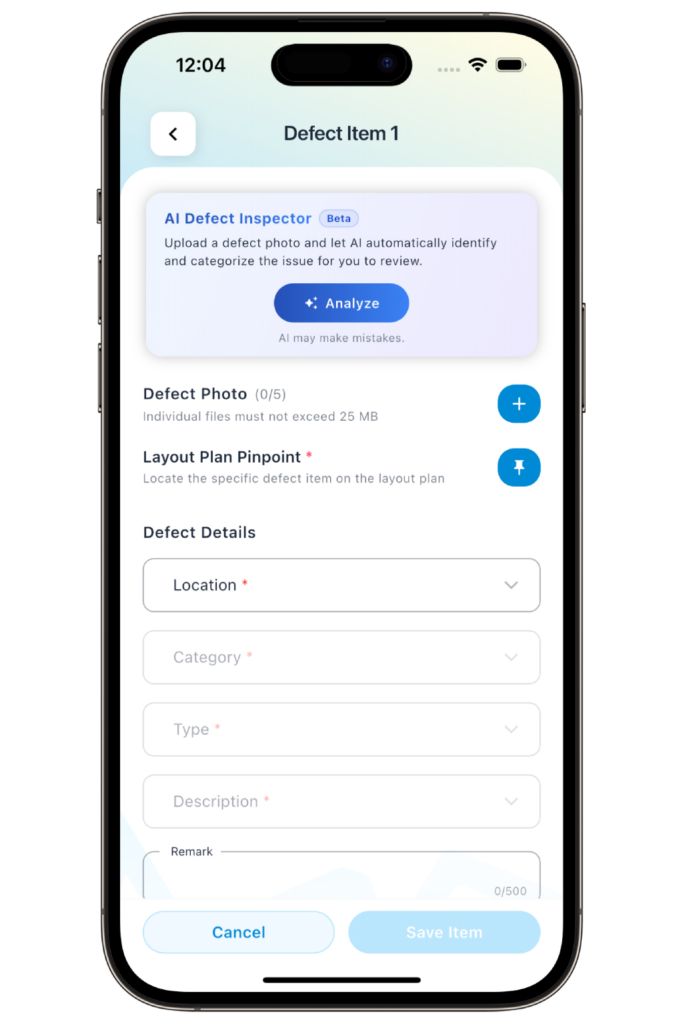
AI Defect Reporting: The Buyer Takes the Photo, the System Writes the Report
The buyer cannot classify a defect and never will — they do this once in their lives. But they can point a camera at it, and the photo is the most reliable thing they produce.
So we moved the classification work off the buyer and into the system. The owner opens the app, photographs the defect, and uploads it. The AI reads the image and fills in the defect report — what the fault is, which category and item it falls under, and a description written in the vocabulary the defect team already uses. The owner reviews what came back, pinpoints the location on the layout plan, and submits.
Two things follow from that. Tickets arrive complete, so the first action on receipt is to approve and assign rather than to chase the buyer for clarification. And the same fault is named the same way across every unit in the project — which is what makes defect data usable in aggregate. Two hundred tickets filed as “leaking”, “water coming out”, and “pipe problem” cannot be traced back to one subcontractor’s workmanship. Two hundred tickets classified identically at the point of capture can.
Defect Management, Tracked End to End
The auto-filled report enters a workflow the defect team controls from submission to acknowledged rectification:
- Admin creates the defect list for the project.
- The owner receives an auto-mailer.
- The owner submits the defect report — now photo-first, with AI auto-fill.
- The CRM and defect teams are notified.
- The defect team assigns a contractor.
- The case is marked resolved.
- The buyer is notified of completion.
- A rectification appointment is arranged.
- The buyer acknowledges acceptance.
Supporting that flow in V2:
- Defect pinpointing on layout plans — the buyer marks the exact spot and attaches photos and video, so the contractor arrives knowing which wall in which room.
- Multiple layout plans per project — defects are reported against the correct floor plan for that unit type, not a generic one.
- Approve or reject submissions — every report is reviewed before it enters the rectification queue.
- Status tracking — each ticket carries a visible state from submitted to resolved.
- Resubmission setting — you configure whether, and how, a buyer can resubmit a defect that was not fully rectified.
- Rectification appointment — a joint inspection with the buyer and the assigned contractor, scheduled in the system rather than over WhatsApp.
- Auto reminders on pending tickets — nothing sits untouched because a name was missed on a tracker.
Vacant Possession, From Appointment to Keys
The other half of the release is the VP module, which handles the handover itself:
- Admin creates the VP appointment timetable for the project, with available dates and slots.
- The buyer receives an email and app notification.
- The buyer checks their VP details in the app.
- The buyer books a slot.
- Admin approves the booking, or it is auto-approved.
- The buyer acknowledges and signs the digital handover checklist on the spot.
- CRM hands over the keys.
Advance maintenance fee collection runs through the same app, so purchasers can settle payments before they arrive rather than at the counter on handover day. That requires an i-Account subscription.
Why the Two Modules Ship Together
Developers have historically run handover scheduling and defect tracking as two separate exercises — appointment slots on a spreadsheet, defects on a tracker, no link between them. Buyer records get re-keyed and nobody can see the state of a unit as a whole.
Keeping both in iNeighbour removes that gap. The buyer who booked their VP slot in the app already has it installed, is already matched to their unit, and is already looking at the correct layout plan when the first defect appears a week later. The point we made in A Spreadsheet Is Not a Defect Management System applies to the handover as a whole: the tracker is not the problem, the disconnection is.